
Jelasin: AI Text & Image Analysis with Gemini, Context Aware & Summarizer🚀
by hikarithesun
v2.1 Updated Apr 3, 2025 403KiB
⚠️Not updated in over a year
Description
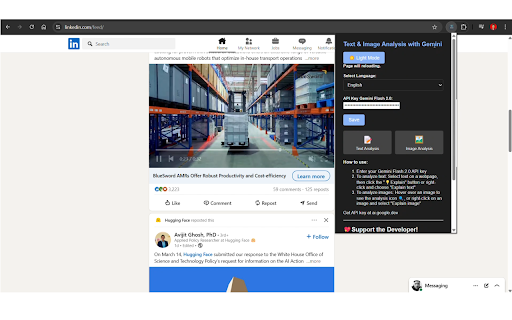
Stop wasting time switching tabs for explanations! Jelasin brings the power of advanced AI, driven by Gemini, directly to your Chrome browser. Get instant, accurate, and context-aware summaries and analyses of text and images, enhancing your online comprehension and productivity like never before.
💖 Support the Developer!
☕ PayPal: paypal.me/dodotnanda
💖 Saweria: saweria.co/dodotnanda
✨ Key Features:
✅ Choose Your Gemini Model:
🔹 Choose from a range of Gemini models (including 1.5, 2.0 and 2.5) to optimize performance, accuracy, and cost. Enjoy free access within defined usage limits, making powerful AI accessible to everyone.
🔹 Keywords: "Gemini model selection", "choose AI model"
✅ AI-Powered Text Summarization & Explanation:
🔹 Select any text on a webpage, click the 💡 button, and receive a concise, AI-generated summary and clear explanation. Perfect for quickly grasping complex information.
🔹 Keywords: "text summarization," "AI text explanation," "content summarizer."
✅ Smart Image Analysis & Interpretation:
🔹 Click the 🔍 icon on any image to unlock detailed insights and interpretations. Extract valuable information from visuals instantly.
🔹 Keywords: "image analysis," "AI image interpretation," "visual content analysis."
✅ Intelligent Context Awareness:
🔹 Our Jelasin remembers previous analyses within the same browsing session, providing contextually relevant and coherent explanations. Enjoy a more natural and intuitive interaction.
🔹 Keywords: "context-aware AI," "conversational AI," "persistent context."
✅ One-Click Copy & Save:
🔹 Easily copy and save AI-generated summaries and analyses for later use, streamlining your research and workflow.
🔹 Keywords: "copy AI summary," "save AI analysis," "productivity tools."
✅ Customizable User Interface:
🔹 Enjoy a comfortable viewing experience with light and dark mode options, tailored to your preferences.
🔹 Keywords: "dark mode chrome extension," "light mode extension."
✅ Multi-Language Support (English & Indonesian):
🔹 Seamlessly switch between English and Indonesian for a wider user base.
🔹 Keywords: "multi-language AI," "English Indonesian AI."
✅ Seamless In-Page Integration:
🔹 No more tab switching! Everything happens directly on the webpage, allowing for uninterrupted browsing and analysis.
🔹 Keywords: "in-page AI," "integrated AI analysis."
🎯 Ideal For:
✅ Students & Researchers:
🔹 Quickly summarize and understand academic papers, articles, and research materials.
🔹 Keywords: "research tools," "student AI tools."
✅ Writers & Journalists:
🔹 Gain deeper insights into source materials and visuals for accurate and compelling content creation.
🔹 Keywords: "content creation tools," "journalist AI."
✅ Professionals & Curious Learners:
🔹 Efficiently grasp new concepts, analyze data, and enhance your understanding of online information.
🔹 Keywords: "information analysis," "learning tools."
🌟 Why Choose Jelasin?
Jelasin stands out by providing not only instant AI analysis but also intelligent context awareness, making online information more accessible and understandable. Enhance your productivity and comprehension with a tool that remembers your interactions.
🌟 Ready to Supercharge Your Browsing?
🔥 Try JELASIN now and experience AI-powered explanations like never before!
🔗 https://chromewebstore.google.com/detail/jelasin/hfpappdnhifeidbddappgcfmljininaf
✨ How to Get Your Free Google Gemini API Key ✨
Follow these simple steps:
1️⃣ Go to Google AI Studio:
* Open this link in your browser: ➡️ https://aistudio.google.com/ ⬅️
* (You might need to log in with your Google Account and agree to the terms).
2️⃣ Find the API Key Option:
* Look in the top left corner of the Google AI Studio page.
* Click on the button labeled "Get API Key". 🔑
3️⃣ Create Your Key:
* Click the "Create API Key" button.
* (You may be prompted to create or select a project – follow the simple steps).
4️⃣ Copy the Key:
* Your unique API key will appear.
* Click the "Copy" button 📋 next to it.
5️⃣ Paste the Key:
* Go back to the application (like Jelasin, your extension, etc.).
* Find the API Key input field and paste your copied key there.
✅ All Set! You can now use features powered by the Gemini API.
🔒 Remember: Treat your API Key like a password – keep it secret and safe!
🔔 Don’t forget to comment, and share if you find Jelasin useful! 🚀
#ai #ChromeExtension #GeminiAI #Productivity #WebTools #TechInnovation #ContextAware #ImageAnalysis #TextSummarization #Summarizer #OnlineLearning #ResearchTools
#AI #ChromeExtension #GeminiAI #Productivity #TechInnovation #SmartTools


Reviews
Loading reviews...
Permissions (3)
Permissions
activeTabℹ Can access the current tab when you click the extension contextMenusℹ Can add items to the right-click menu storageℹ Can store data locally in your browser
Details
| Version | 2.1 |
| Updated | Apr 3, 2025 |
| Size | 403KiB |
| First Seen | Mar 31, 2026 |
More by hikarithesun


Popular in tools

Zotero Connector
by Zotero
8M
★ 3.96
tools
8M
★ 3.96
tools

Browsec VPN - Free VPN for Chrome
by Browsec
7M
★ 4.44
tools
7M
★ 4.44
tools

AnyDoc Translator - Translate Web and PDF
by www.wps.com
7M
★ 4.58
tools
7M
★ 4.58
tools

WPS PDF - Read, Edit, Fill, Convert, and AI Chat PDF with Ease
by www.wps.com
7M
★ 4.45
tools
7M
★ 4.45
tools

Video DownloadHelper
by Aclap
5M
★ 4.43
tools
5M
★ 4.43
tools
Popular Extensions

Adobe Acrobat: PDF edit, convert, sign tools
by Adobe Inc.
331M
★ 4.40
workflow
331M
★ 4.40
workflow

AdBlock — block ads across the web
by AdBlock
62M
★ 4.48
workflow
62M
★ 4.48
workflow

迅雷下载支持
by Shenzhen Xunlei Network Technology Co., Ltd.
59M
★ 2.77
workflow
59M
★ 2.77
workflow

Grammarly: AI Writing Assistant and Grammar Checker App
by Grammarly
42M
★ 4.50
communication
42M
★ 4.50
communication

Adblock Plus - free ad blocker
by eyeo GmbH
40M
★ 4.39
workflow
40M
★ 4.39
workflow