
Description




Reviews (9 cached)
task integration is not really, free as in free trail wasn't clear
JUNK Annual renewal, free version or should I say demo is very crippled, It will never integrate with Google task, the premium version only allows a one time import of Google tasks so you are able to get your whole database in it, but forcing and delegating other folks will have to purchase into the this yearly annual subscription to collaborate with each other. Much better options out there that are completely free use your brain and do a good search using the key works Task or look for Gnotes is another shared option and it's completely free and syncs with android w/reminders etc. Justin Cram DyingJedi
Services is beginning to fail. I recently started having problems with calendar integration. According to forums this has been going on for months, no solution. No support, even with premium level.
Way too buggy for the $25 I paid for it. Too many problems to list.
Don't see why this needs google sign in. Doesn't sync with my google tasks.
I wanted a system that syncs with google tasks. This doesn't. For my purposes, it is not a useful program. I uninstalled it.
How is this application a chrome extension? I see zero integration with Chrome... you have to maintain a webpage open and you could use any browser to do it... The idea was to have it working in my browser, to remind me of tasks that are due... now I have to remember to open a webpage... I have to remember to check my reminders... kind of pointless...
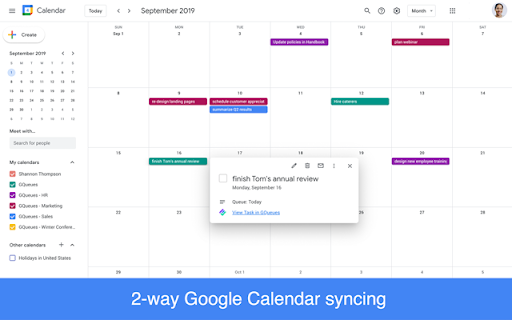
Pros - It makes good use of desktop real estate when I clip my Chrome browser to one side of the screen. I can still see my tasks. - GQueues also offers two-way sync with Google Calendar which is something that I think is a bit unique with GQueues because other task outliners which are more popular (e.g., MyLifeOrganized, Todoist and Toodledo, etc.) have failed to do this. - GQueues is also available for Apple and Android products and, in my experience, has worked efficiently and well. - The add-on for Chrome browser works great, allowing me to add tasks quickly. Cons My biggest problem with this web app is the fact that it seems to settle for being good instead of being great. The two-way sync with Google Calendar is what brought me to it and GQueues is way better than using Google Tasks but development is slow. There are features that aught to have been there a few years ago that most basic task list managers have but GQueues is yet to implement. For example,the user is not able to select multiple tasks which can make moving multiple tasks from one queue to another easy. You have to move each one individually. Entering tasks is awkward, at best. You have to hit the 'Add task' button to enter a task initially but then you can use the tab key to enter the second one. However, watch out! If you miss that tab key, you've lost your opportunity to add a task using the keyboard. You must then use the 'Add task' button again. To me, this seems to suggest that the developer is having a hard time implementing something that would make this action much less effortless. Summary Although I'm not using GQueues right now due to the Cons listed above, I still recommend it if you're looking for a decent task outliner system that is better than Google Tasks. The fact that it two-way syncs with Google Calendar is what adds real power to the program. However, my general consensus, when it comes to web apps is that they generally suck. The just don't have the power that installable software can bring.
This is a great application, and (for an annual subscription) will integrate nicely with Google Calendar. As much as I loved this, I am disappointed to have to subscribe to have the features I really needed. I think $25 annual licensing per user in my household of 8, is too steep a price. Even at the bulk licensing rate, it would be at least $160 each year. Uninstalled and searching for something else.
Details
| Version | 1.0.2 |
| Updated | Jan 19, 2022 |
| Size | 4.99KiB |
| First Seen | Mar 31, 2026 |
Popular Extensions




