
⚠️Requests 1 sensitive permission
Description
This is the official lenso.ai Chrome extension. Lenso.ai is an AI-powered reverse image search tool. With lenso.ai’s image search extension, you can quickly find people, places, duplicates, and similar or related images without leaving the website. You can also use this tool to find images based on text.
📷 How to use the extension?
The lenso.ai extension adds the following features to your browser, accessible from the context menu:
• Search by image: Right-click any image on a website and select “Search by image with lenso.ai.”
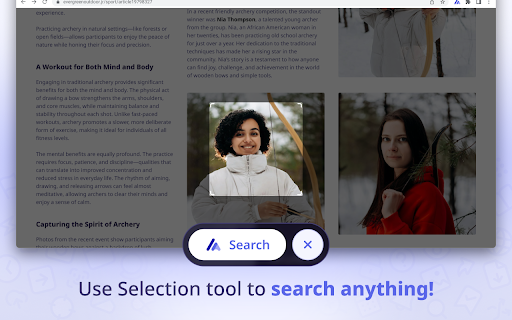
• Search by selection: Left-click the extension icon or choose “search by selection with lenso.ai” from the context menu to perform a reverse image search on any selected area on the website.
• Search by text: Select any text on a website, right-click, and choose “search by text with lenso.ai.”
👉 With this extension, there’s no need to save or copy content — you can quickly search for images without leaving the website.
📷 Manage search results on lenso.ai
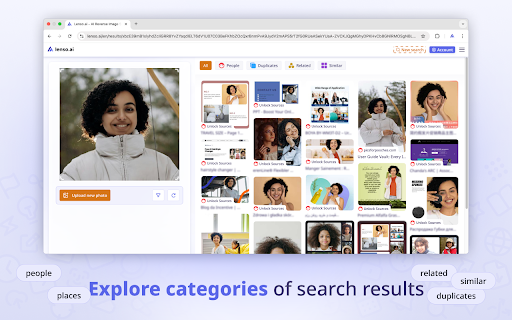
On lenso.ai you can search for:
• People
• Duplicates (copyright image search)
• Places
• Related images
• Similar images
📷 Use filter/sorting options to narrow your search on lenso.ai:
👉 Filter by:
• Text - search by keywords; upload a blue mug and try the keyword “red” to find red mugs
• URL - search only on a specific website by providing its URL
👉 Sort by:
• Newest/Oldest - sort pictures based on the date of indexing
• Best/Worst match - sort based on how well the image matches the pictures in the index
• Random - sort randomly for more diverse results
• Show diverse results - find the same people or places in different arrangements.
👉 You can create an Alert for a specific image and receive email notifications about new results and save images to Collections for future references!
👉 There is also an API available on lenso.ai. Easily grow your business by implementing the best reverse image search API!
Start reverse image search with lenso.ai!


Reviews (4 cached)
★☆☆☆☆2026-02-04
Subbu B
It's not free. So, no use for those looking for free version.
★☆☆☆☆2025-11-17
Alexey Skripnik
I got error "CAPTCHA verification failed. Please try again." every time, but I'm sure I solve it right. Guys, please fix your CAPTCHA!
★☆☆☆☆2025-10-24
Michael
Slaps a watermark on all results, then demands a subscription to see the sources. Scummy Ai company.
★☆☆☆☆2025-08-18
Ray Dysart
Doesn't work without a subscription and lies about matches to reel you in
Permissions (3)
Permissions
activeTabℹ Can access the current tab when you click the extension contextMenusℹ Can add items to the right-click menu cookiesℹ Can read and modify browser cookies
Details
| Version | 1.2 |
| Updated | Jun 18, 2025 |
| Size | 217KiB |
| First Seen | Mar 29, 2026 |
Popular in tools

Zotero Connector
by Zotero
8M
★ 3.96
tools
8M
★ 3.96
tools

Browsec VPN - Free VPN for Chrome
by Browsec
7M
★ 4.44
tools
7M
★ 4.44
tools

AnyDoc Translator - Translate Web and PDF
by www.wps.com
7M
★ 4.58
tools
7M
★ 4.58
tools

WPS PDF - Read, Edit, Fill, Convert, and AI Chat PDF with Ease
by www.wps.com
7M
★ 4.45
tools
7M
★ 4.45
tools

Video DownloadHelper
by Aclap
5M
★ 4.43
tools
5M
★ 4.43
tools
Popular Extensions

Adobe Acrobat: PDF edit, convert, sign tools
by Adobe Inc.
331M
★ 4.40
workflow
331M
★ 4.40
workflow

AdBlock — block ads across the web
by AdBlock
63M
★ 4.48
workflow
63M
★ 4.48
workflow

迅雷下载支持
by Shenzhen Xunlei Network Technology Co., Ltd.
59M
★ 2.77
workflow
59M
★ 2.77
workflow

Grammarly: AI Writing Assistant and Grammar Checker App
by Grammarly
42M
★ 4.50
communication
42M
★ 4.50
communication

Adblock Plus - free ad blocker
by eyeo GmbH
41M
★ 4.39
workflow
41M
★ 4.39
workflow