
⚠️Not updated in over a year
Description
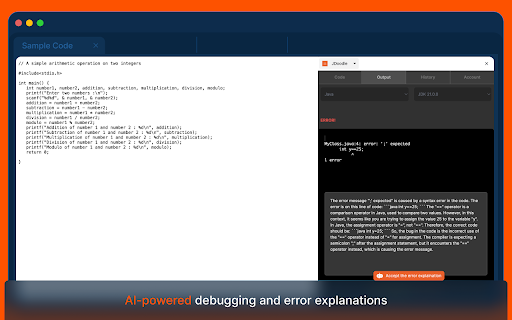
The JDoodle Chrome Extension is a revolutionary tool that lets users effortlessly execute programs from any webpage. It's designed for both convenience and efficiency, making coding more accessible than ever.
With JDoodle's Chrome Extension, coding becomes more integrated into your browsing experience. It's an indispensable tool for developers, learners, and coding enthusiasts who seek a seamless, productive, and elevated coding journey.
Key Features:
- Effortless Code Execution: Select code on a webpage, right-click, and execute directly with JDoodle. Alternatively, open code in the JDoodle extension with a simple right-click.
- Execution History Tracking: Easily access the history of executed codes, including website links and results.
- User Login Requirement: Users must log in to the extension for personalized and secure usage.
- Smart Language Detection: Utilize JDoodle AI for automatic programming language detection.
- Future AI Enhancements: Look forward to advanced AI features from JDoodle's main website in upcoming releases.
User Scenarios:
- New Users: Log in and open programs on JDoodle.com.
- Logged-in Users:
- Execute programs within the extension.
- Manage and view execution history.
- Access JDoodle.com for more features.
- Securely log out as needed.
Technical Insights:
- The extension maintains an independent login session from the browser.
- It uses a token-based system similar to mobile apps for user recognition.
- Compatible with both Chrome and Microsoft Edge, ensuring wide accessibility.



Reviews
Loading reviews...
Permissions (5)
Permissions
activeTabℹ Can access the current tab when you click the extension contextMenusℹ Can add items to the right-click menu sidePanel storageℹ Can store data locally in your browser tabsℹ Can see your open tabs and their URLs
Details
| Version | 1.2 |
| Updated | Jun 17, 2024 |
| Size | 4.98MiB |
| First Seen | Mar 28, 2026 |
Popular in tools

Zotero Connector
by Zotero
8M
★ 3.96
tools
8M
★ 3.96
tools

Browsec VPN - Free VPN for Chrome
by Browsec
7M
★ 4.44
tools
7M
★ 4.44
tools

AnyDoc Translator - Translate Web and PDF
by www.wps.com
7M
★ 4.59
tools
7M
★ 4.59
tools

WPS PDF - Read, Edit, Fill, Convert, and AI Chat PDF with Ease
by www.wps.com
7M
★ 4.45
tools
7M
★ 4.45
tools

Video DownloadHelper
by Aclap
5M
★ 4.43
tools
5M
★ 4.43
tools
Popular Extensions

Adobe Acrobat: PDF edit, convert, sign tools
by Adobe Inc.
331M
★ 4.40
workflow
331M
★ 4.40
workflow

AdBlock — block ads across the web
by AdBlock
62M
★ 4.48
workflow
62M
★ 4.48
workflow

迅雷下载支持
by Shenzhen Xunlei Network Technology Co., Ltd.
59M
★ 2.77
workflow
59M
★ 2.77
workflow

Grammarly: AI Writing Assistant and Grammar Checker App
by Grammarly
42M
★ 4.50
communication
42M
★ 4.50
communication

Adblock Plus - free ad blocker
by eyeo GmbH
41M
★ 4.39
workflow
41M
★ 4.39
workflow