
⚠️Very few reviews for its user base
Description
Send any file of any size directly from your Chrome browser with Gmail!
With the TransferNow extension for Chrome, forget about size limits for your attachments in Gmail. Simplify file transfer without overloading your inbox or that of your recipients, while enhancing your image or that of your company.
Why choose the TransferNow extension for Chrome and Gmail?
– Send files of all types and sizes: Don't worry about Gmail's size restrictions.
– Stay informed about downloads: Receive notifications when your files are downloaded.
– Control the data you send: Manage access to your files with ease.
– Enhance your image: Personalize your transfers to suit your image!
How does the TransferNow extension for Chrome and Gmail work?
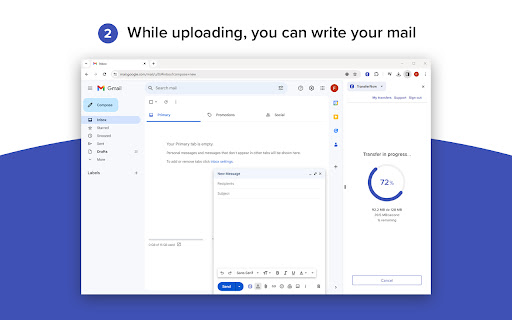
From your Chrome browser, click on the "TransferNow" button at the top right of your screen, or click directly on the "TransferNow" button available when you write a new message from Gmail.
The side panel opens, prompting you to log in to your account. Once logged in, select one or more files to send, or select a folder.
Customize your transfer: set a subject, create a personalized link, password-protect file access, enable download notifications, preview and stream files before uploading, and more.
Click on "Transfer" to start sending your files. Once the transfer is complete and the security check has been carried out, you'll get a link to copy and paste or insert directly into your new Gmail message.
That's it! Send your email with your file download link 🚀
Compatibility : The TransferNow extension for Chrome is compatible with Gmail and can be used with any Gmail account. A TransferNow account is required to use this extension.
You can also create download links for your files outside Gmail.
If you don't have a TransferNow account yet, check out our offers here => https://www.transfernow.net/en/prices


Reviews
Loading reviews...
Permissions (3)
Permissions
activeTabℹ Can access the current tab when you click the extension scriptingℹ Can inject scripts into web pages sidePanel
Details
| Version | 1.1.4 |
| Updated | Nov 25, 2025 |
| Size | 6.73MiB |
| First Seen | Apr 1, 2026 |
Popular in tools

Browsec VPN - Free VPN for Chrome
by Browsec
8M
★ 4.44
tools
8M
★ 4.44
tools

Zotero Connector
by Zotero
8M
★ 3.96
tools
8M
★ 3.96
tools

AnyDoc Translator - Translate Web and PDF
by www.wps.com
7M
★ 4.58
tools
7M
★ 4.58
tools

WPS PDF - Read, Edit, Fill, Convert, and AI Chat PDF with Ease
by www.wps.com
7M
★ 4.45
tools
7M
★ 4.45
tools

Video DownloadHelper
by Aclap
5M
★ 4.43
tools
5M
★ 4.43
tools
Popular Extensions

Adobe Acrobat: PDF edit, convert, sign tools
by Adobe Inc.
322M
★ 4.40
workflow
322M
★ 4.40
workflow

AdBlock — block ads across the web
by AdBlock
62M
★ 4.48
workflow
62M
★ 4.48
workflow

迅雷下载支持
by Shenzhen Xunlei Network Technology Co., Ltd.
59M
★ 2.77
workflow
59M
★ 2.77
workflow

Grammarly: AI Writing Assistant and Grammar Checker App
by Grammarly
42M
★ 4.50
communication
42M
★ 4.50
communication

Adblock Plus - free ad blocker
by eyeo GmbH
40M
★ 4.39
workflow
40M
★ 4.39
workflow