
Description
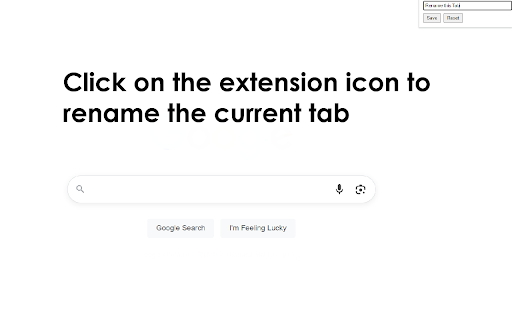
Modern knowledge workers juggle dozens—sometimes hundreds—of open tabs each day. While browsers offer basic tab-management tools, they rarely tackle the most fundamental cognitive burden: remembering which tab is which. A rename-tabs extension lets you edit the title of any open tab, so instead of twenty pages that all read “Dashboard – Company Name,” you see clear, task-oriented labels such as “Q2 Metrics,” “Client A Brief,” or “Invoice Template.” That seemingly simple change delivers a surprising range of benefits, from faster navigation to better focus and lower memory load. Below are the key reasons a rename-tabs plugin deserves a permanent slot in your productivity toolkit.
Instant Visual Landmarks for Faster Navigation Default page titles are often generic, truncated, or identical across multiple tabs. Renaming converts those cryptic snippets into meaningful labels you choose, creating visual landmarks your brain can scan in milliseconds. Instead of hovering over favicons or cycling with Ctrl + Tab, you jump directly to “Marketing Plan DRAFT” or “Vendor Contract v3,” shortening retrieval time on every context switch. Compounded over a full workday, that recovery adds up to minutes—or even hours—of reclaimed time.
Cognitive Off-Loading and Reduced Mental Fatigue Working memory is finite; the more details you try to juggle, the quicker you tire. By externalizing tab context into explicit names, you off-load that information from your brain onto the interface. This “second brain” approach frees cognitive bandwidth for higher-level thinking, research, or creative problem-solving. The effect is subtle but significant: fewer “What was I doing in this tab?” moments and a smoother mental flow, especially during long stretches of deep work.
Enhanced Focus During Presentations and Screen Sharing Nothing derails a client demo faster than fumbling through a sea of ambiguous tabs while your audience waits. Renaming helps you script your flow: arrange tabs in order and label them “Step 1,” “Step 2,” “Live Demo,” and “Q&A Resources.” When sharing your screen, viewers see crisp, purposeful titles instead of half-visible URLs or irrelevant brand slogans, projecting professionalism and keeping the meeting on track.
Reviews
Loading reviews...
Permissions (3)
Permissions
activeTabℹ Can access the current tab when you click the extension scriptingℹ Can inject scripts into web pages storageℹ Can store data locally in your browser
Details
| Version | 0.1.3 |
| Updated | May 14, 2025 |
| Size | 53.42KiB |
| First Seen | Apr 1, 2026 |
More by Free Apps

Adblocker for Youtube™
by Free Apps
400K
★ 4.10
workflow
400K
★ 4.10
workflow

Tab Auto Refresh
by Free Apps
200K
★ 3.88
workflow
200K
★ 3.88
workflow

DXF Viewer
by Free Apps
100K
★ 2.72
workflow
100K
★ 2.72
workflow

Mirror Mode for Google Meet™
by Free Apps
100K
★ 4.57
workflow
100K
★ 4.57
workflow

Font Finder
by Free Apps
80K
★ 4.75
workflow
80K
★ 4.75
workflow
Popular in tools

Zotero Connector
by Zotero
8M
★ 3.96
tools
8M
★ 3.96
tools

Browsec VPN - Free VPN for Chrome
by Browsec
7M
★ 4.44
tools
7M
★ 4.44
tools

AnyDoc Translator - Translate Web and PDF
by www.wps.com
7M
★ 4.58
tools
7M
★ 4.58
tools

WPS PDF - Read, Edit, Fill, Convert, and AI Chat PDF with Ease
by www.wps.com
7M
★ 4.45
tools
7M
★ 4.45
tools

Video DownloadHelper
by Aclap
5M
★ 4.43
tools
5M
★ 4.43
tools
Popular Extensions

Adobe Acrobat: PDF edit, convert, sign tools
by Adobe Inc.
331M
★ 4.40
workflow
331M
★ 4.40
workflow

AdBlock — block ads across the web
by AdBlock
63M
★ 4.48
workflow
63M
★ 4.48
workflow

迅雷下载支持
by Shenzhen Xunlei Network Technology Co., Ltd.
59M
★ 2.77
workflow
59M
★ 2.77
workflow

Grammarly: AI Writing Assistant and Grammar Checker App
by Grammarly
42M
★ 4.50
communication
42M
★ 4.50
communication

Adblock Plus - free ad blocker
by eyeo GmbH
41M
★ 4.39
workflow
41M
★ 4.39
workflow