
⚠️Not updated in over a year ⚠️Below average rating ⚠️Very few reviews for its user base
Description
💡 Have you ever questioned 'how to save images from Google Docs' directly? The inability to right-click and save images is a significant pain point disrupting the workflow of Google Docs users.
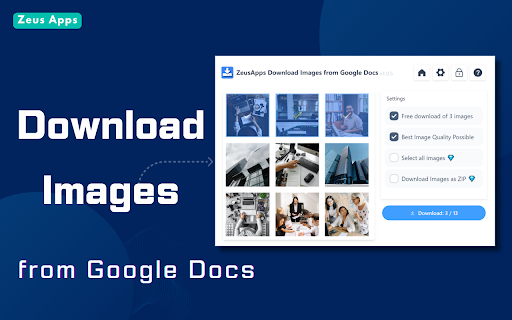
Our Chrome extension provides a straightforward solution: a simple click on the 'Download' button lets you easily download and save images from any Google Docs.
Why Choose ZeusApps' Images QuickSave Tool:
●One-click downloads
●Saves images from Google Doc in high resolution
●Streamlines your workflow
How To Use It: A Step-by-Step Guide
1.Install from the Chrome Web Store with one click.
2.Open any Google Docs document.
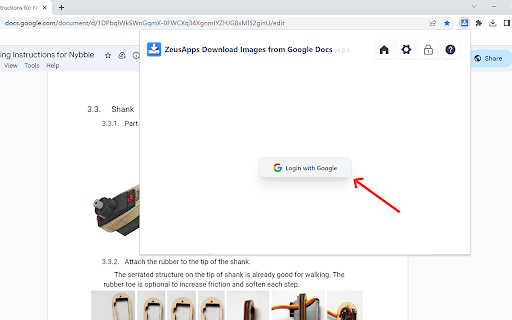
3.Click the QuickSave extension icon.
4.Download images instantly.
Key Features of The Images QuickSave Extension:
1. One-Click Downloads: With QuickSave, you can save images from any Google Doc with just a single click. It’s that easy - no more cumbersome process.
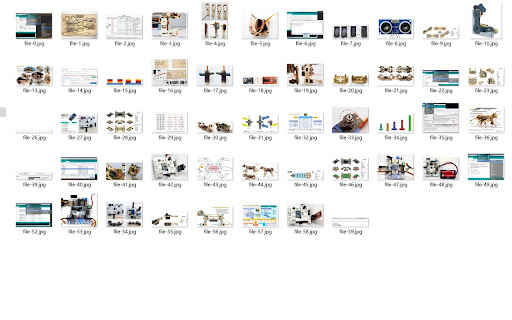
2. Batch Image Saving: Select multiple images within a document and download them all at once, saving you valuable time and clicks.
3. High-Resolution Support: QuickSave preserves the original image quality, ensuring that your downloads are crystal clear and free of compression artifacts.
4. Fast and Efficient: Designed to be lightweight and fast, QuickSave won’t slow down your browser or Google Docs, offering a smooth user experience.
5. Easy Access: The extension icon sits neatly in your Chrome toolbar, giving you quick access to its features whenever you're working in Google Docs.
6. Secure and Private: We respect your privacy. QuickSave doesn’t store or access any of your personal data beyond the images you choose to download.
7. Regular Updates: The ZeusApps team is committed to improving QuickSave. We regularly release updates to enhance functionality and user experience.
Experience the best way to download and save images from Google Docs with ZeusApps’ QuickSave extension – your productivity partner.
FAQs For ZeusApps' Images QuickSave Extension
Q: How does the ZeusApps extension make downloading images from Google Docs easier?
A: ZeusApps simplifies the process by allowing users to download images directly from Google Docs with a single click, eliminating the need for complex workarounds.
Q: Can I save multiple images at once from a Google Doc using ZeusApps?
A: Absolutely! Our extension supports batch downloads, enabling you to save time by downloading all needed images from a document in one go.
Q: Will the image quality be preserved when I download using the ZeusApps extension?
A: Yes, the ZeusApps Google Docs Image Downloader retains the original quality and resolution of your images, ensuring crisp and clear visuals.
Q: Is the ZeusApps extension secure to use?
A: We strictly adhere to the Privacy Policy and Secure Handling Requirements of the Google Chrome Web Store. The ZeusApps extension only accesses your Google Docs documents to retrieve the images for download. No personal or sensitive data is stored or transmitted by the extension.
Q: Do I need to pay to use the ZeusApps Google Docs Image Downloader?
A: Our extension offers both free and premium features. The basic image downloading functionality is available at no cost, while advanced features can be accessed with a subscription.
Q: How often is the ZeusApps extension updated?
A: We regularly update the extension to introduce new features, enhance existing ones, and ensure compatibility with the latest versions of Google Docs and Chrome.
Q: What makes ZeusApps different from other image downloading tools for Google Docs?
A: Our tool stands out due to its ease of use, high-quality image downloads, commitment to security, and responsive customer support.


Reviews (1 cached)
★☆☆☆☆2024-11-19
Steven Hoffman
You can only download 3 images for free, so it's functionally useless. Don't waste your time.
Permissions (2)
Permissions
downloadsℹ Can manage and monitor downloads storageℹ Can store data locally in your browser
Details
| Version | 1.0.7 |
| Updated | Oct 28, 2024 |
| Size | 904KiB |
| First Seen | Mar 31, 2026 |
More by ZeusApps

Free Ai Youtube Video Title Generator
by ZeusApps
772
★ 2.50
tools
772
★ 2.50
tools

Free AI Youtube Video Tags Generator TubeAide
by ZeusApps
438
★ 5.00
tools
438
★ 5.00
tools

Free AI Tag Generator for Youtube - TubeAide
by ZeusApps
374
★ 4.50
tools
374
★ 4.50
tools

AI Response Generator for Email Review Reply
by ZeusApps
190
★ 0.00
communication
190
★ 0.00
communication
Popular in tools

Zotero Connector
by Zotero
8M
★ 3.96
tools
8M
★ 3.96
tools

Browsec VPN - Free VPN for Chrome
by Browsec
7M
★ 4.44
tools
7M
★ 4.44
tools

AnyDoc Translator - Translate Web and PDF
by www.wps.com
7M
★ 4.58
tools
7M
★ 4.58
tools

WPS PDF - Read, Edit, Fill, Convert, and AI Chat PDF with Ease
by www.wps.com
7M
★ 4.45
tools
7M
★ 4.45
tools

Video DownloadHelper
by Aclap
5M
★ 4.43
tools
5M
★ 4.43
tools
Popular Extensions

Adobe Acrobat: PDF edit, convert, sign tools
by Adobe Inc.
331M
★ 4.40
workflow
331M
★ 4.40
workflow

AdBlock — block ads across the web
by AdBlock
63M
★ 4.48
workflow
63M
★ 4.48
workflow

迅雷下载支持
by Shenzhen Xunlei Network Technology Co., Ltd.
59M
★ 2.77
workflow
59M
★ 2.77
workflow

Grammarly: AI Writing Assistant and Grammar Checker App
by Grammarly
42M
★ 4.50
communication
42M
★ 4.50
communication

Adblock Plus - free ad blocker
by eyeo GmbH
41M
★ 4.39
workflow
41M
★ 4.39
workflow