
Description
🚀 SnapGen Flow - Automate Your Google Flow Video Creation
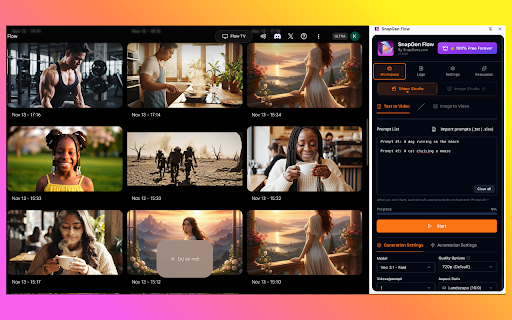
Transform your Google Flow workflow with powerful automation for Text-to-Video and Image-to-Video creation. Create hundreds of videos in minutes, not hours.
Changelog v4.0.42
What's New:
🎬 Portrait Mode for Ingredients
- Added 9:16 vertical aspect ratio support for Ingredients mode in Image-to-Video
- Now you can create stunning portrait videos for TikTok, Reels, and Shorts using your ingredient sets
Coming Soon:
🚀 HD & 4K Video Export (In Development)
- Upscale and download videos at 1080p Full HD resolution
- 4K Ultra HD export for professional-quality output
- Stay tuned for the next update!
-----------------------------
Changelog v3.2.0 → v4.0.39
What's New in v4.0.39
🎨 Image Studio (NEW)
Full Image Studio support with Text-to-Image automation
Auto-download images via Chrome API (same as Video Studio)
Image Quality options: 1K (default), 2K & 4K (coming soon)
Image Model selection: Imagen 4, Nano Banana, Nano Banana Pro
"Ingredients to Image" mode (coming soon)
🔧 Improvements
Studio Tabs: Easy switching between Video Studio and Image Studio
Blocking Dialog Handler: Auto-dismiss Google popups ("I agree", "OK", etc.)
Smart image scanning: Filters UI elements, downloads only generated images
Unified settings layout for both studios
📦 v3.2.5 Updates
Import Folder: Select entire folder for Image-to-Video Single Mode
Faster image batch processing
📦 v3.2.3 Updates
Storage Stats: View extension storage usage
Clear Cache: Free up storage space with one click
Custom Filename Prefix: Personalize downloaded file names
📦 v3.2.0 Updates
Multi-line Prompts: Support complex prompts with line breaks
News Popup System: Stay updated with latest features
------------------------------------------------
Update 10.12.2025:
What's New in v3.2.0:
📝 Multi-line Prompts Support (NEW!)
- Write long prompts across multiple lines, auto-merged
- Split prompts using `--` or blank lines
- Prefix support: `P1:`, `Prompt#1`, `#1` (auto-stripped)
- Backward compatible: each line = one prompt
📢 News Popup System
- Announcements and update notifications
- Show-once functionality
🎨 UI Improvements
- Beautiful bundle naming dialog
- Better positioned close buttons
✨ Full Features:
- Text-to-Video automation
- Image-to-Video 3 modes: Single, Start-End, Ingredients
- VEO 2 and VEO 3.1 support
- Auto-download videos
- 12 languages supported
-------------------------------
Update 05.12.2025:
🎬 Image-to-Video with 3 Powerful Modes
Transform your images into stunning videos with our enhanced Image-to-Video automation:
1. Single Image Mode
- Upload one image and generate multiple videos with different prompts
- Or match N images with N prompts for batch processing
- Toggle between 1→N and N→N mapping modes
2. Start-End Mode
- Create smooth video transitions between two images
- Set a START image and END image for each video
- Lock options: Use the same start/end image across all tasks
- Perfect for morphing effects and scene transitions
3. Ingredients Mode (VEO 3.1)
- Upload 1-3 reference images (faces, clothing, objects, scenes)
- VEO automatically recognizes and maps your ingredients
- Generate consistent videos across multiple prompts
- No manual labeling needed - AI handles the matching
Additional Features:
- Excel template import for bulk prompts
- Persistent data across browser sessions
- Real-time preview and status tracking
----------------------------------------------------------------------
✨ KEY FEATURES
📝 Text-to-Video Automation
• Batch process multiple prompts
• Auto-apply model & aspect ratio settings
• Smart retry logic with error handling
• Real-time progress tracking with ETA
🖼️ Image-to-Video Automation
• Upload images in bulk with auto-sorting
• 1:1 image-to-prompt pairing
• Support for landscape & portrait ratios
• Smart crop tool automation
⚡ Automation Features
• Configurable start position
• Randomized wait times (30-180s)
• Policy error detection & skip
• Auto-download generated videos
• Pause/Resume/Stop controls
🎨 User Interface
• Beautiful dark theme with glass morphism
• Dual studio selector (Video/Image)
• Organized settings tabs
• Real-time logs & failed tasks tracking
• 12 languages support
📊 Progress Tracking
• Live progress bar
• Downloaded video counter
• Estimated completion time
• Failed prompts with reasons
• Copy failed tasks for retry
🌍 Multi-language
• English, Vietnamese, Japanese, Korean
• Chinese, Spanish, French, German
• Indonesian, Thai, Hindi, Portuguese
💎 Premium Features (All Free)
• Unlimited automation
• No subscription required
• All features included
• Regular updates
🔒 Privacy & Security
• No data collection
• Works offline (after config load)
• Local storage only
• Open source friendly
📚 How to Use
1. Navigate to labs.google/fx/tools/flow
2. Open SnapGen Flow side panel
3. Choose Text-to-Video or Image-to-Video mode
4. Configure your settings
5. Import/paste your prompts or select images
6. Click Start and let automation do the work!
💡 Perfect For
• Content creators
• Marketing teams
• Social media managers
• Video producers
• AI enthusiasts
🎯 Requirements
• Google Flow access
• Chrome browser (latest)
• Valid Google account
⚙️ Advanced Settings
• Dynamic model selection
• Customizable video counts
• Flexible wait time ranges
• Auto-download configuration
• Theme customization
🔄 Regular Updates
• New features monthly
• Bug fixes weekly
• Remote config updates
• Model list auto-sync
📞 Support
• Email: support@snapgens.com
• Documentation: Full guides included
🏆 Why Choose SnapGen Flow?
✅ Save 10x time on bulk video creation
✅ Professional automation features
✅ Clean, intuitive interface
✅ Completely free forever
✅ Active development & support
✅ Privacy-focused (no tracking)
⭐ Made with ❤️ by SnapGens.com
Start automating your Google Flow videos today!


Reviews (1 cached)
★☆☆☆☆2026-02-24
Akbar A
app is not working, only errors 21:13:55 ● Loading selectors... 21:13:55 ● Selectors loaded successfully. 21:13:55 ● No project ID found, attempting to create new project... 21:13:55 ● New Project button not found - assuming already in a project 21:13:55 ● Clicking Videos tab to ensure Video Studio mode... 21:13:58 ● Failed to apply settings, refreshing page and retrying... 21:14:07 ● Failed to apply settings
Permissions (6)
Permissions
activeTabℹ Can access the current tab when you click the extension downloadsℹ Can manage and monitor downloads scriptingℹ Can inject scripts into web pages sidePanel storageℹ Can store data locally in your browser tabsℹ Can see your open tabs and their URLs
Details
| Version | 4.0.42 |
| Updated | Jan 19, 2026 |
| Size | 2.12MiB |
| First Seen | Mar 30, 2026 |
Popular in tools

Browsec VPN - Free VPN for Chrome
by Browsec
8M
★ 4.44
tools
8M
★ 4.44
tools

Zotero Connector
by Zotero
8M
★ 3.96
tools
8M
★ 3.96
tools

AnyDoc Translator - Translate Web and PDF
by www.wps.com
7M
★ 4.58
tools
7M
★ 4.58
tools

WPS PDF - Read, Edit, Fill, Convert, and AI Chat PDF with Ease
by www.wps.com
7M
★ 4.45
tools
7M
★ 4.45
tools

Video DownloadHelper
by Aclap
5M
★ 4.43
tools
5M
★ 4.43
tools
Popular Extensions

Adobe Acrobat: PDF edit, convert, sign tools
by Adobe Inc.
322M
★ 4.40
workflow
322M
★ 4.40
workflow

AdBlock — block ads across the web
by AdBlock
62M
★ 4.48
workflow
62M
★ 4.48
workflow

迅雷下载支持
by Shenzhen Xunlei Network Technology Co., Ltd.
59M
★ 2.77
workflow
59M
★ 2.77
workflow

Grammarly: AI Writing Assistant and Grammar Checker App
by Grammarly
42M
★ 4.50
communication
42M
★ 4.50
communication

Adblock Plus - free ad blocker
by eyeo GmbH
40M
★ 4.39
workflow
40M
★ 4.39
workflow