
⚠️Not updated in over 2 years ✅Highly rated
Description
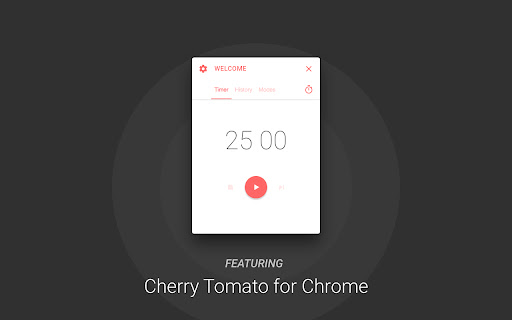
This app was designed to boost your productivity with an altered version of Pomodoro Technique®.
Highlights:
Different modes for different scenarios
History summary
Mini timer
* Important: Require Chrome version 57+
Update 3.2.21:
Bug fix:
· Now the timer will play the clock ticking sound at correct time
Update 3.2.19:
Bug fixes:
· Two invisible bugs
UI improvement:
· Preference panel toggle animation will no longer be disrupted by quickly clicking on the gear button
Improvement:
· Project structure optimization and package size reduction
Update 3.2.14:
Improvement:
· Improved timer accuracy
Update 3.2.13:
New features:
· Language picker
UI improvement:
· Splash screen
Update 3.1.12:
New language:
· German
Special thanks to Maik
Update 3.0.10:
UI Changes:
· Now always showing toggle button for mini mode
Update 3.0.9:
New language:
· Portuguese (Portugal)
· Portuguese (Brazil)
Special thanks: Sérgio Mota
Update 3.0.8:
Bug fixes:
· Fixed a bug that cause the user could not start the timer if Auto Focus is disabled in active mode.
· Now when a user skipped a phase, app will not send any notification about this change.
Update 3.0.7:
Bug fixes:
· Fixed a issue that cause timer stop working during the phase after first focus phase.
· Now gap notification will only show up during focus phase.
Major update 3.0.5:
Multiple UI changes:
· Now you can use tabs to navigate
· A tab action button for major operation in different tabs
· Mode picker function is now the action button on timer page
· The mini mode is now accessible using the lock button in header area
New features:
· Now you can reset your history data in preference panel
· You can use the quick generation button to generate all phase durations from your focus time setting. It's located next to focus time input in editor.
· A summary card is now provided in history tab. You can get most important history data quicker than ever.
· Now you can navigate on timeline when checking out your history chart
· A new option in mode editor lets you play clock ticking sound when using the timer.
Function changes:
· Now idle detection is disabled by default when you create new modes.
Update 2.0.07:
Changes:
· Now double click the title area will toggle app mini mode
Major update 2.0.0:
Code rewrite. All new experience.
New features:
· Modes: You can now create modes for different scenarios
· History:Check history data in last 7 or 30 days
· Mini mode: Use Ctrl (Cmd) + Shift + 0 to toggle mini mode
· Endless loop: Long rest will be disabled once this option is on
· Gap for work session: A notification will be send few minutes before the end of focus to give you time finish up work on your hand
· Advanced idle detection settings
· The auto begin for work and rest is now separated
Changes:
· Removed main notification and in-notification controls
Update 1.3.1:
UI enhancement:
*Now with categorized settings.
New features:
*Alarm:
Now provides alarm. By far, the app is using audio clips from android lollipop ringtones, will find other audio
clips on the near future. If you have great recommendation, please let me know. : )
Bug fixes:
*Fixed the bug that causes windows users could not open setting panel and close the app using buttons.
*Fixed the bug that actual work cycles does not fit the setting.
Update 1.2:
New feature:
*Detect idle state:
App will pause the clock when your system is idle or locked, and it will resume the clock when the system is
active again.
If you turned on the auto cycle function, the app will not auto reset and start the timer if your system is idle
or locked. The app will start the timer only if it the system state is changed to active.
Bug fixes:
*Fixed the bug that causes the app could not initialize correctly and freeze at timer interface.
Update 1.1:
New features:
* Stop timer inside the app
* Skip this state inside the app or notification
* Two more settings
Automatically Cycle: App will not stop the timer between two phases
Send Notification: App will send you notification: 1. when a phase ends 2. as a controller
Change:
* Removed the stop button inside the notification


Reviews (7 cached)
★☆☆☆☆2015-07-21
ZZZ
can't be used.
★★★☆☆2023-10-07
Elias Layng
no longer up, deleted by author. although i guess people say it was a good app
★★★☆☆2019-12-11
Heather Brodie
really like it but the notification sound hasn't been sounding - even though it's turned on.
★★★☆☆2017-05-07
Quim
Pros: Functional and design simplicity. Cons: It crash sometimes (stops from counting) and is time fixed (countdowns of 25 mins - rest of 6 mins).
★★★☆☆2016-09-19
Brian Toan Nguyen
Simple but effecient. Need ability to customixe theme/color
★★★☆☆2016-04-12
S Y
doesn't show up in the chrome extension bar. have to go to extension list to bring it up and then it has to stay in a separate window, can't be integrated with the browser.
★★★☆☆2016-03-16
Alex W
Looks great, just wish there was a way to hide the timer screen without cancelling the timer.
Permissions (9)
Permissions
alarmsℹ Can schedule periodic background tasks app.window.alwaysOnTop idleℹ Can detect when you're away from the computer notificationsℹ Can show desktop notifications power storageℹ Can store data locally in your browser system.display
Host Permissions
http://cil.rocks/*ℹ Can access cil.rocks websites https://sentry.io/*ℹ Can access sentry.io websites
Details
| Version | 3.2.25 |
| Updated | Feb 14, 2022 |
| Size | 1.44MiB |
| First Seen | Mar 28, 2026 |
Popular Extensions

Adobe Acrobat: PDF edit, convert, sign tools
by Adobe Inc.
331M
★ 4.40
workflow
331M
★ 4.40
workflow

AdBlock — block ads across the web
by AdBlock
63M
★ 4.48
workflow
63M
★ 4.48
workflow

迅雷下载支持
by Shenzhen Xunlei Network Technology Co., Ltd.
59M
★ 2.77
workflow
59M
★ 2.77
workflow

Grammarly: AI Writing Assistant and Grammar Checker App
by Grammarly
42M
★ 4.50
communication
42M
★ 4.50
communication

Adblock Plus - free ad blocker
by eyeo GmbH
41M
★ 4.39
workflow
41M
★ 4.39
workflow