Talking Timer - Custom Speaking Timer icon

Talking Timer - Custom Speaking Timer

by Paul Nicholas

v1.2.0 Updated Sep 20, 2017 467KiB
CWS
2K
Users
★ 3.86
21 reviews
#14904
of 208.5K
Other
Category
⚠️Not updated in over 2 years

Description

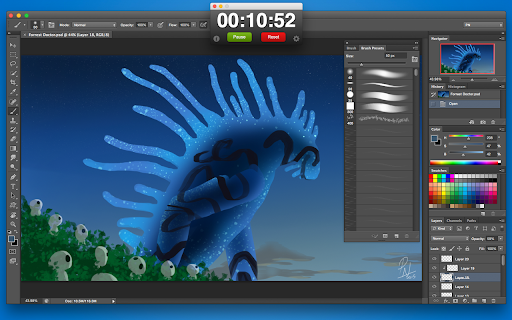
This app was born out of necessity for a simple timer that would notify me at various intervals during a countdown. I developed this app specifically for use while creating digital paintings as part of a Daily Spitpaint challenge (time-limited to 30mins) . Feeling that this app could be useful to others, I decided to make it customisable for all purposes. FEATURES • Clean and easy to use • Customisable timer duration • Customisable Text to Speech (TTS) alerts at specific intervals • Can be easily "pinned" to the Taskbar (Windows) or Dock area (Mac) • Option to keep application always on top of other windows How to "Pin" Talking Timer to Taskbar/Dock The Talking Timer was created as a Chrome App so to that it could be easily "pinned" to the Taskbar (Windows)/Dock (Mac) for quick access, without the need to open Chrome. To "pin" Talking Timer for quick access, perform the following steps: • Click to [Open Apps] in Chrome • Click on the Talking Timer to run it • Now Right-click the Talking Timer icon in the Taskbar/Dock area • ...and select "Pin to Taskbar"/"Keep in Dock" option Now you can quickly load and view the Talking Timer, without needing Chrome open!
Talking Timer - Custom Speaking Timer screenshot 1Talking Timer - Custom Speaking Timer screenshot 2Talking Timer - Custom Speaking Timer screenshot 3

Reviews (3 cached)

★☆☆☆☆2015-12-24
Heber Cloward

For some reason it keeps taking the "Timer Start" value and thinking that THAT is how long it needs to count down from. So I put in start at 12.01 PM I typed it in at 11.45AM But for some reason the count down timer is counting DOWN from 12:00:59 12:00:58 12:00:57 12:00:56..... So only 12 more hours left until the next alarm that I set? Something went wrong here

★★☆☆☆2023-07-24
Lyss

Doesn't seem to work anymore. Doesn't even start and can't find an alternative. 😭

★★☆☆☆2020-01-12
David

I am reviewing my review yet again, Over many years, I have had various problems with this otherwise excellent app so I deleted it. In 2020 I re-installed it and it was perfect. In late 2022, it stopped working again. It just didn't do anything. Since then, it quite simply sometimes works and sometimes doesn't.

Permissions (3)

Permissions

alwaysOnTopWindows storage Can store data locally in your browser tts Can use text-to-speech

Details

Version 1.2.0
Updated Sep 20, 2017
Size 467KiB
First Seen Mar 26, 2026