
Description

Reviews (50 cached)
love it
All my tab groups and pinned tabs are gone! I uninstalled immediately.
Can't choose which windows out of several. It chooses for you. Very frustrating. Clicking the "1" box merges some other window at random into current one. This has no undo feature? Hitting the "1" multiple times merges all your windows into one, undoing your diligence in keeping tabs in separate windows. The window pairing function doesn't seem to work properly. All I need is to have two "NiftySplit" (see that extension) windows paired so that when one is active, the other appears on screen as well. This extension's options seem to imply that is possible, but it won't let me choose which two windows out of the available windows to use the extension on!
It crashed my browser (I am using Microsoft Edge btw)
As useless as 'Split Screen for Google Chrome', uninstall in 5 secs
Dualles destroys gruops of tabs - I've got 6 groups, each c.a. 20 tabs, now I've one window without groups :( "Split screen" extension does it better.Sometimes millions of users means nothing, especially for old extension without updates.
I had sorted my tabs into tab groups and it removed them all from their groups. 0/10.
It is a way to quickly adjust the size of two windows. It does not simulate two monitors as it claims. If it did, when I tried to maximize a window it would again put it in the pre-set layout. If I said to maximize a window, it would maximize it within the area/section it was in not back to your full monitor. Lastly, and something I didn't expect from it, you would be able to select a section/monitor to share during zoom or other screen shares. It does none of that. I'm sure it's fine for a different use case, but it doesn't do what it is advertised to do.
I had a bunch of important tabs open, including pinned tabs. Dualless stopped working, closed all tabs and there's no way to retrieve it from search history.
Literally, yes literally, pointless.
Absolutely useless, if you run windows you can drag a window to the side of the screen and it will automatically fill half your screen (50%). I can drag 3 apps on my monitors resolution. We don't talk about apple since I dont use it.
pressing windows key+left/right does the same thing and you can do it with every app. useless
cant work with powerpoint files
You don't really need a chrome extension for dual screening.You can just click Win Key+ Left/Right arrow.That does it.And even the extension is good for nothing.I wouldn't add it if I were you.
bad
Am I simple minded or what? I find this useless. It's very difficult to get the tabs I want into the right place. It seems much easier to just open a new window, resize it and put it where I want it. In less time than it took me to write that.
cant using like before
Cant get it to work, perhaps another app renders it invalid.
It only splits windows, it doesn't actualy split the tabs INSIDE the window.. pointless
NOT GOOD!
Such a long explanation which isn't really accurate. The extension resizes your browser into only two browsers with a pre-defined size you chose, it's not handy at all.
Initially quite useful; now it crashes my browser each time I launch the extension
Still not what I looking for. When splitted vertically (there's upper and lower part), It shows in the lower part a new browser window with address bar and everything else that wastes the screen's real estate.
Ive been using this for a little over a year or two. I loved it at first but now it won't stop glitching. If I use it now, it will close out all my tabs. Please fix this because I genuinely found it very helpful.
Does what computers can already do but worse, just drag your window to the side.
i still have to do it the old fashion way
It works 1 out of 4 tries
It just resizes the window. Does not work on full screen.
I have four windows open and unfortunately, it resizes two at once or even combines the tabs in two of them, reducing my windows down to three. Sadly seems a bit buggy but may come back sometime in the hope that these issues have been fixed.
I will change it to 5 once someone tells me how to turn it off, surely just selecting the 1 option ( merge two windows into a maximized window) is not the way, why is there no toggle where you can simply just turn it off once you want to go back to normal.
woah chromebooks already do it
Crashing after open. It used to be very good, but now, not working anymore. W11.
Great idea but Windows 11 & Mac OS have features like this.
It is good but you can not pick what tabs if you have at of that's this makes it a 3 stars for me
I love this for the minimalist UI but unfortunately it ungroups all my tab groups so I'll have to uninstall..
It's indeed helful but on splitting it doesn't keep my tabs group intact. So, when I am splitting I have to go back and put all tabs again into that group.
its pretty good actually, but its okay i just want to get stick around with my drag into the side one
Great app that serves its purpose. But it sometimes crashes my computer when I want to split my screen
Isn't this feature done by windows snap feature already ?
Good idea, but you don't need the extension. If you have Windows, you can just use a shortcut: Win + Left Arrow (move tab to left side of screen) Win + Right Arrow (move tab to right side of screen) Win + Down Arrow (move tab to bottom of screen) Over all, its ok.
was okay
This is helpful because its better than making a new window and putting it on one side because you have to constantly click on the other window for it to pop up, but this extension always has the 2 windows popped up the same time. But, there is this annoying problem that every time I use this a couple of time, I click on the extension and its just blank. This is annoying because I have to keep reinstalling it because of this problem. Fix your glitches, please!
a shortcut to make new window :D
Honestly, it isn't all that remarkable. I want a tab that can hold multiple "screens". This is essentially opening two browser windows, and using your split screen feature (at least on Windows). I don't have a modern Chromebook to test this on, nor do I own ANYTHING Apple, so I can't say anything that route. Just not what I am looking for regarding the feature, and ultimately redundant regarding what Windows can already do without the need of an extension.
LISTEN HERE- THIS EXTENSION IS POINTLESS AND HERES WHY ok look to its credit it does what it says it does. But at the same time its also extremely useless. All this extension does for you is that it resizes your window- something you can EASILY DO on both Mac and windows without the use of a friggin extension. It's actually easier to do it without the extension. All you have to do is drag your window out to the side and it already automatically fills half the screen. This by far is the most convoluted and stupidest way to do an already dumbed down and simple task. ITS NOT ROCKET SCIENCE PEOPLE.
It does a decent job, but for whatever reason it stops working on a daily basis. It will start working again when in "manage extensions" mode, just toggle it off, then toggle it back on again.
I love the concept. I love this extension when it consistently works. I do not like, or even love, when (at random) clicking on the dualless extension brings up a blank list versus the usual list of dual monitor options.
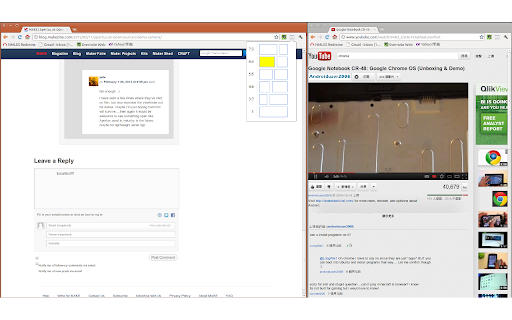
+ Can arrange two windows side-by-side - Limited to predefined layouts (see screenshot) - No choice in what windows are resized when running 2+ windows
Really good application, I don't give it 5* because it resets my pinned tabs to normal tabs. Keep up the good work =)
A little buggy on the new chromebook. I had to shutdown and restart at one point because Dualless forced minimized everything. Also, it does not recognize the chromebook taskbar which makes side scrolling difficult.
Permissions (2)
Permissions
Details
| Version | 0.4.1 |
| Updated | Dec 29, 2023 |
| Size | 266KiB |
| First Seen | Mar 29, 2026 |
More by Ben Lau



Popular in tools



Popular Extensions




