
⚠️Not updated in over a year
Description
LeetCode Difficulty Hider Chrome Extension: A Simplified Tool for Enhanced Learning
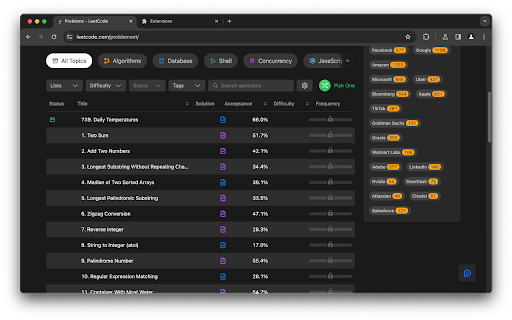
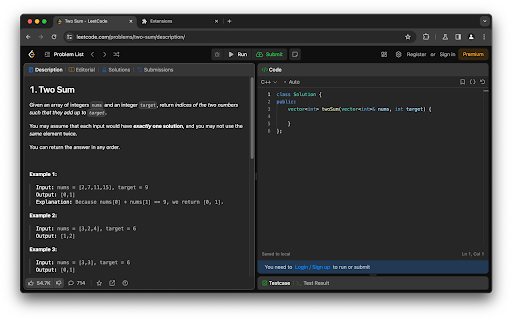
The LeetCode Difficulty Hider is a Chrome extension designed with a specific, valuable purpose: it hides the difficulty labels (Easy, Medium, Hard) of problems on both the international and Chinese versions of LeetCode. This straightforward functionality offers several key benefits that enhance the learning and problem-solving experience on LeetCode.
Key Functionality:
Sole Feature - Hiding Difficulty Levels: The extension's only function is to conceal the difficulty rating of each problem, thereby presenting them without any pre-assigned complexity level.
Why Install the LeetCode Difficulty Hider?
Encourages Unbiased Engagement with Problems: Without visible difficulty levels, users are more likely to approach problems based on their learning goals or interest, rather than being influenced by a label. This can lead to tackling a wider variety of problems.
Reduces Intimidation and Mental Blocks: Often, a 'Hard' label can intimidate, while an 'Easy' label might lead to complacency. Hiding these labels removes such mental blocks, encouraging users to focus on the problem itself.
Facilitates Deeper Learning: By engaging with problems without preconceived notions about their difficulty, users can deepen their understanding and problem-solving skills, focusing solely on the logic and concepts involved.
Simulates Real-World Scenarios: In real-world coding challenges, especially in interviews, problems aren't labeled by difficulty. Practicing in an environment that mimics this reality can better prepare users for such situations.
Reviews (1 cached)
★★★☆☆2024-05-21
Suraj Meena (Suraj Meena)
The difficulty is still visible in the left sidebar that can be collapsed/expanded. It would be great if you could fix this
Permissions (2)
Permissions
activeTabℹ Can access the current tab when you click the extension storageℹ Can store data locally in your browser
Details
| Version | 1.1.2 |
| Updated | Jan 15, 2025 |
| Size | 27.59KiB |
| First Seen | Apr 1, 2026 |
Popular in tools

Browsec VPN - Free VPN for Chrome
by Browsec
8M
★ 4.44
tools
8M
★ 4.44
tools

Zotero Connector
by Zotero
8M
★ 3.96
tools
8M
★ 3.96
tools

AnyDoc Translator - Translate Web and PDF
by www.wps.com
7M
★ 4.58
tools
7M
★ 4.58
tools

WPS PDF - Read, Edit, Fill, Convert, and AI Chat PDF with Ease
by www.wps.com
7M
★ 4.45
tools
7M
★ 4.45
tools

Video DownloadHelper
by Aclap
5M
★ 4.43
tools
5M
★ 4.43
tools
Popular Extensions

Adobe Acrobat: PDF edit, convert, sign tools
by Adobe Inc.
322M
★ 4.40
workflow
322M
★ 4.40
workflow

AdBlock — block ads across the web
by AdBlock
62M
★ 4.48
workflow
62M
★ 4.48
workflow

迅雷下载支持
by Shenzhen Xunlei Network Technology Co., Ltd.
59M
★ 2.77
workflow
59M
★ 2.77
workflow

Grammarly: AI Writing Assistant and Grammar Checker App
by Grammarly
42M
★ 4.50
communication
42M
★ 4.50
communication

Adblock Plus - free ad blocker
by eyeo GmbH
40M
★ 4.39
workflow
40M
★ 4.39
workflow