
✅Recently updated
Description
Introducing Younet chrome extension, a personalized copilot anywhere you need to write or respond!
➤ What is it?
Younet is a personalized AI technology that empowers you to write or respond contextually relevant drafts, responses, ideas, and more instantly across any CRM, Email, Text Form, Google Docs, Help Desk, and various other platforms.
With this extension you may connect your created AI model and always have it by your side. You'll have the ultimate assistant to tackle complex questions and tasks. Whether you need help writing emails, reading articles, or conducting smart searches, Younet AI is here to assist you.
➤ How to start?
Here are some quick start tips:
1. Install the extension and click on it to Login.
2. Once you logged-in, you can now use @younet command to activate extension, the simply ask what you need to write.
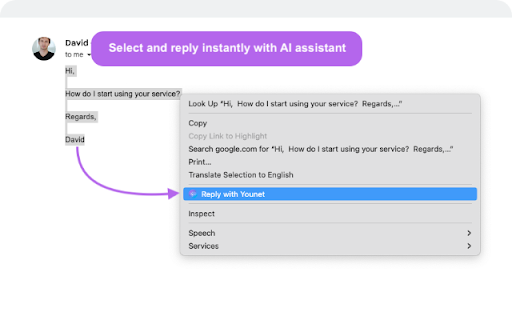
3. Select any text or a question on the page you want to receive a response and click Reply with Younet or right mouse click then Reply with Younet.
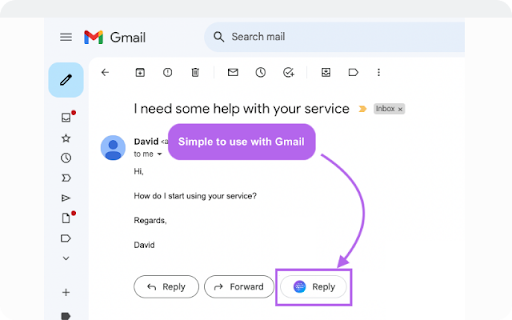
4. In Gmail it’s fully integrated to use native buttons directly in the email to respond.
Experience the power or AI, and take your productivity to new heights. Get started today!
➤ Is it free to use?
Yes, current version of Chrome extension and all capabilities of the platform are free to use but require approval by Younet.
➤ Terms and Conditions
By installing the extension, you agree to and acknowledge:
www.younet.ai/terms-and-conditions
www.younet.ai/terms-and-conditions#privacy-policy



Reviews
Loading reviews...
Permissions (3)
Permissions
contextMenusℹ Can add items to the right-click menu storageℹ Can store data locally in your browser tabsℹ Can see your open tabs and their URLs
Details
| Version | 0.1.763 |
| Updated | Apr 2, 2026 |
| Size | 493KiB |
| First Seen | Apr 3, 2026 |
Popular in communication

Grammarly: AI Writing Assistant and Grammar Checker App
by Grammarly
42M
★ 4.50
communication
42M
★ 4.50
communication

Loom – Screen Recorder & Screen Capture
by Loom
8M
★ 4.58
communication
8M
★ 4.58
communication

QuillBot: AI Writing and Grammar Checker Tool
by quillbot
5M
★ 4.69
communication
5M
★ 4.69
communication

DeepL: translate and write with AI
by team-browser-extensions
4M
★ 4.73
communication
4M
★ 4.73
communication

Email Tracker by Mailtrack®
by Mailsuite
3M
★ 4.42
communication
3M
★ 4.42
communication
Popular Extensions

Adobe Acrobat: PDF edit, convert, sign tools
by Adobe Inc.
322M
★ 4.40
workflow
322M
★ 4.40
workflow

AdBlock — block ads across the web
by AdBlock
62M
★ 4.48
workflow
62M
★ 4.48
workflow

迅雷下载支持
by Shenzhen Xunlei Network Technology Co., Ltd.
59M
★ 2.77
workflow
59M
★ 2.77
workflow
Grammarly: AI Writing Assistant and Grammar Checker App
by Grammarly
42M
★ 4.50
communication
42M
★ 4.50
communication

Adblock Plus - free ad blocker
by eyeo GmbH
40M
★ 4.39
workflow
40M
★ 4.39
workflow