
JanitorAI Chat Downloader, Reader & Exporter
v1.6.3.1 Updated Sep 18, 2025 118KiB
Description
Are you looking for the missing export chat buttons on JanitorAI?
Are you tired of using complicated methods to save or archive your favorite JanitorAI chats?
This tool makes it easy!
Key Features:
★ One-Click Download & Export Buttons on JanitorAI chat page
Directly integrated into the JanitorAI chat page, you can now download & export your favorite chats instantly — no more tedious processes or missed messages!
★ Export in Multiple Formats
EPUB — Preserves the original style and formatting for smooth reading experience on eReaders & apps. Works best with Lithium, PocketBook & Reasily apps.
TXT & Markdown — Neatly structured for easy editing and sharing.
SillyTavern Chat Format (JSONL) — Effortless import into SillyTavern.
JSON — Raw chat data, ideal for simple backups.
★ Offline Chat Reader
Access and read your archived JanitorAI chats locally without internet
Why install it?
✓ Simplifies Chat Management
Say goodbye to copying, pasting, unreliable tools, or tedious screenshotting. This extension ensures no messages are lost!
✓ Super Easy and Time-Saving
With download and export buttons directly on JanitorAI chat page, saving your chats takes just a single click
✓ Read Anywhere, Anytime
Exported files are compatible with browsers and eReader apps, letting you revisit your chats the way you prefer.
✓ Preserves Original Formatting
EPUB files retain the exact style and layout of your JanitorAI chats for an authentic reading experience.
✓ Perfect for Archiving & Long-Term Storage
Keep your chats safe and neatly organized for personal keepsakes, references, or sharing.
--------------------------------------
💡How to use the extension?
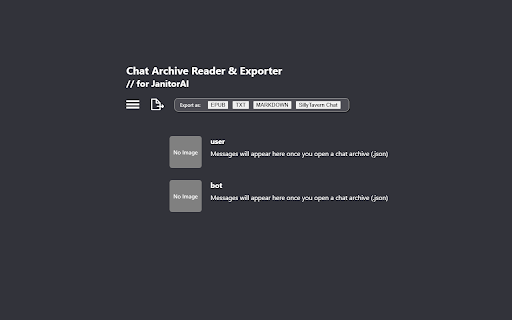
📖 If you want to open the Archive Reader
➡️ Option 1: Pin the extension to your toolbar for easy access and click the icon
➡️ Option 2: Click the "Open Chat Archive Reader" button on JanitorAI chat page
🗂️ If you want to read archived chats using the built-in archive reader in this extension:
➡️ On your JanitorAI chat page, click the "Download Chat Archive (.json)" button
➡️ Then import this .json file into the reader provided by the extension.
📦 If you want to import chats (.jsonl file) into SillyTavern:
➡️ First, make sure the character is already imported into SillyTavern. *This step needs to be done manually.*
➡️ Then, on the JanitorAI chat page, click Export As > SillyTavern Chat to download a .jsonl file.
➡️ In SillyTavern, open character menu and click on your imported character, click View Chat History > Import Chat, and choose the .jsonl file you just downloaded.
For detailed instructions on how to import a chat, please kindly refer to the official SillyTavern documentation.
📚 If you want to export chats as .epub / .md / .txt / SillyTavern chat format (.jsonl)
➡️ Option 1: Using export buttons available on JanitorAI chat page
➡️ Option 2: Using the archive reader
--------------------------------------
Latest Updates
v1.6.3.1
- Fix major bugs caused by JanitorAI site renewal<br>
- Improved UX design on export experience

Reviews (3 cached)
★★☆☆☆2025-05-13
Matt Hunting
When I try to download, it keeps putting an L at the end of the file name. Instead of reading .json it says .jsonl, so I am unable to upload it. Even if I take the L off, it says it's invalid
★★★☆☆2025-07-27
peipei
It was good, but recently didn't on JAI work anymore ( not sure if it the extension's fault or the JAI website's fault ), I clicked on Export chat and download chat archive but nothing worked :(
★★★☆☆2025-07-09
Jaythe_0ne1241
The export tool doesn't work. I sent you an email explaining further. I did what it said, uploaded the chat, stuck an image for both persona and bot, put persona name and tried exporting it, I tried all of them, SillyTavern for example. It didnt work for other platforms like c.ai or chub. I was wondering if that would be possible?
Details
| Version | 1.6.3.1 |
| Updated | Sep 18, 2025 |
| Size | 118KiB |
| First Seen | Mar 29, 2026 |
Popular in tools

Zotero Connector
by Zotero
8M
★ 3.96
tools
8M
★ 3.96
tools

Browsec VPN - Free VPN for Chrome
by Browsec
7M
★ 4.44
tools
7M
★ 4.44
tools

AnyDoc Translator - Translate Web and PDF
by www.wps.com
7M
★ 4.58
tools
7M
★ 4.58
tools

WPS PDF - Read, Edit, Fill, Convert, and AI Chat PDF with Ease
by www.wps.com
7M
★ 4.45
tools
7M
★ 4.45
tools

Video DownloadHelper
by Aclap
5M
★ 4.43
tools
5M
★ 4.43
tools
Popular Extensions

Adobe Acrobat: PDF edit, convert, sign tools
by Adobe Inc.
331M
★ 4.40
workflow
331M
★ 4.40
workflow

AdBlock — block ads across the web
by AdBlock
62M
★ 4.48
workflow
62M
★ 4.48
workflow

迅雷下载支持
by Shenzhen Xunlei Network Technology Co., Ltd.
59M
★ 2.77
workflow
59M
★ 2.77
workflow

Grammarly: AI Writing Assistant and Grammar Checker App
by Grammarly
42M
★ 4.50
communication
42M
★ 4.50
communication

Adblock Plus - free ad blocker
by eyeo GmbH
41M
★ 4.39
workflow
41M
★ 4.39
workflow