
Coursera Summary with ChatGPT and Take Notes
v1.0.6 Updated Nov 25, 2025 2.2MiB
⚠️Requests 1 sensitive permission ⚠️Below average rating
Description
Coursera Summary with ChatGPT and Take Notes - Your Summary generator for Coursera courses Chrome Extension
🚀Features:
ChatGPT with Coursera courses summary generator is the ultimate companion for learning through Coursera courses. It allows you to swiftly summarize courses content and generate summaries by utilizing transcribed text with timestamps, enhancing your learning efficiency. Experience the following features:
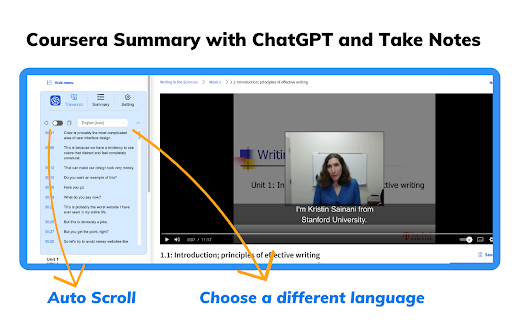
● Instant Timestamps: Click timestamp icons to easily locate the transcript of the current moment in courses videos.
● Auto-Scroll Transcripts: Enable auto-scroll to have transcripts follow along as you watch courses.
● One-Click Copy: Seamlessly copy entire automatically generated transcripts, summaries and Coursera notebooks.
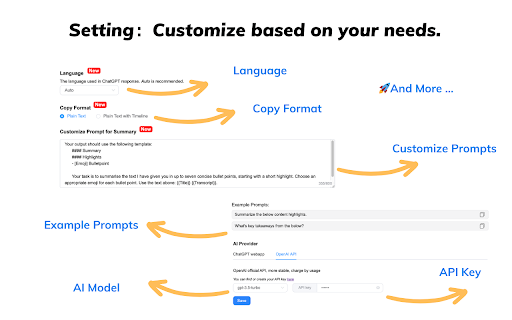
● Customizable Settings: Personalize output language, ChatGPT prompts, text formats and more based on your needs.
🚀How to Use :
● Go to the Coursera website
● Select a course video that you are interested in
● Click the "Transcript & summary" button. If subtitles exist for the video, they will be shown to you.
● If you are logged into chat.openai.com, click the View Summary with ChatGPT button to get a courses summary
● Click the "Copy" icon, then you can easily get a summary for the Coursera course video
💡 Q&A
Q1: What is ChatGPT?
A1: ChatGPT is an OpenAI-developed artificial intelligence chatbot based on OpenAI’s Generative Pre-trained Transformer (GPT) series of large language models (LLMs). ChatGPT can engage in conversations, respond to user requests, write stories, debug programming code, creative writing, and much more.
Q2: What is a Coursera summary?
A2: A Coursera summary is an AI-written overview of the relevant content contained in any courses video on the Coursera platform. The summary provides the user with the video's overall topic and important information without the user having to watch the entire video.
Q4: Do I need to create a ChatGPT/OpenAI account to use this extension?
A4: Yes, you must have a ChatGPT account to generate video summaries. You can create a free account at chat.openai.com, where you can also locate or generate your OpenAI API key.
📢Note:
Coursera is a trademark of Coursera, Inc., registered in the U.S. and other countries. Coursera Summary with ChatGPT and Take Notes is an independent project and has no relationship to Coursera or Coursera, Inc.


Reviews (5 cached)
★☆☆☆☆2024-12-22
Oussama Ch
it doesn't work
★☆☆☆☆2023-09-27
Александр Давыдов
Not work its only for parse your data!
★★☆☆☆2024-03-03
Thiện Phan
There are no transcript
★★★☆☆2024-01-15
Rafika Wulandari
It's not work. Can you please update the AI because this will help lots. Thank you
★★★☆☆2023-12-12
朱标
Not work ,when I learn python for everybody in coursera, it told me "No Transcription Available..."
Permissions (2)
Permissions
storageℹ Can store data locally in your browser webRequestℹ Can observe and analyze network traffic
Details
| Version | 1.0.6 |
| Updated | Nov 25, 2025 |
| Size | 2.2MiB |
| First Seen | Mar 29, 2026 |
More by Castillo Richard

Article Summary with ChatGPT and Take Notes
by Castillo Richard
6K
★ 3.40
tools
6K
★ 3.40
tools

Bilibili Summary with ChatGPT OpenAI
by Castillo Richard
3K
★ 3.13
workflow
3K
★ 3.13
workflow

TikTok Video Tags Summary with ChatGPT
by Castillo Richard
753
★ 2.60
workflow
753
★ 2.60
workflow

YouTube Video Tags Summary with ChatGPT
by Castillo Richard
732
★ 4.00
workflow
732
★ 4.00
workflow
Popular in tools

Zotero Connector
by Zotero
8M
★ 3.96
tools
8M
★ 3.96
tools

Browsec VPN - Free VPN for Chrome
by Browsec
7M
★ 4.44
tools
7M
★ 4.44
tools

AnyDoc Translator - Translate Web and PDF
by www.wps.com
7M
★ 4.58
tools
7M
★ 4.58
tools

WPS PDF - Read, Edit, Fill, Convert, and AI Chat PDF with Ease
by www.wps.com
7M
★ 4.45
tools
7M
★ 4.45
tools

Video DownloadHelper
by Aclap
5M
★ 4.43
tools
5M
★ 4.43
tools
Popular Extensions

Adobe Acrobat: PDF edit, convert, sign tools
by Adobe Inc.
331M
★ 4.40
workflow
331M
★ 4.40
workflow

AdBlock — block ads across the web
by AdBlock
63M
★ 4.48
workflow
63M
★ 4.48
workflow

迅雷下载支持
by Shenzhen Xunlei Network Technology Co., Ltd.
59M
★ 2.77
workflow
59M
★ 2.77
workflow

Grammarly: AI Writing Assistant and Grammar Checker App
by Grammarly
42M
★ 4.50
communication
42M
★ 4.50
communication

Adblock Plus - free ad blocker
by eyeo GmbH
41M
★ 4.39
workflow
41M
★ 4.39
workflow