
⚠️Not updated in over a year
Description
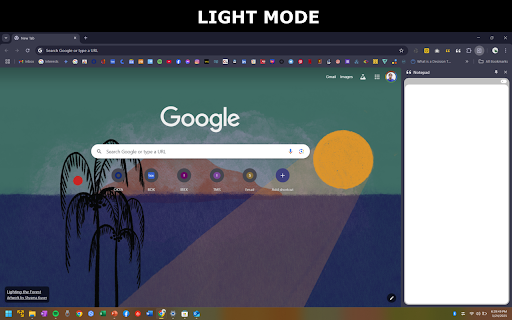
Introducing Version 1.1 – Chrome Side Panel Notepad:
📝 Auto-Open Side Panel: With this new update, the notepad now automatically opens in the side panel, giving you instant access to jot down ideas without interrupting your browsing session.
📝 Effortless Note-Taking: Our notepad seamlessly integrates into Chrome's side panel, providing quick and easy access for jotting down ideas, reminders, or any important information without disrupting your browsing experience.
🎨 Customizable Dark Mode: Enhance your focus and reduce eye strain during late-night browsing sessions with our notepad's customizable dark mode. Tailor your writing environment to match your preferences and create a comfortable, personalized space.
🔄 Automatic Text Saving: Say goodbye to the fear of losing your valuable notes. Our notepad automatically saves your text, ensuring that your thoughts and ideas are preserved even if you accidentally close the browser window.
🖱️ Intuitive Interface: The notepad boasts a clean and user-friendly interface, making it a breeze to use. Enjoy a distraction-free writing experience with minimalistic design, allowing you to focus solely on your thoughts.
🔗 Seamless Integration: As a Chrome extension, our notepad seamlessly integrates into your browser's side panel, ensuring that it's always within arm's reach whenever you need to jot down a quick note or capture an important idea.
🚀 Boosted Productivity: Streamline your workflow by having a dedicated space for notes directly within your Chrome browser. No more switching between tabs or applications – our notepad is designed to enhance your productivity and keep you in the flow.
🌐 Universal Accessibility: Access your notes from any device with Chrome, ensuring a consistent and unified note-taking experience across all platforms. Your ideas are never out of reach, whether you're on your computer, tablet, or mobile device.
🔒 Privacy and Security: Rest easy knowing that your notes are stored locally and securely within Chrome's local storage. We prioritize your privacy and ensure that your personal thoughts remain private.
⚙️ Easy Installation: Installing our Chrome Side Panel Notepad is a breeze. Simply add it to your Chrome extensions, and you're ready to enjoy a seamlessly integrated note-taking experience.
Upgrade your browsing experience today with the Chrome Side Panel Notepad – the ultimate companion for staying organized, boosting productivity, and capturing ideas on the fly!
#Notepad Side Panel
#Notepad Sidebar


Reviews
Loading reviews...
Permissions (3)
Permissions
contextMenusℹ Can add items to the right-click menu sidePanel storageℹ Can store data locally in your browser
Details
| Version | 1.1 |
| Updated | Feb 2, 2025 |
| Size | 278KiB |
| First Seen | Mar 29, 2026 |
More by John Nicole


Popular in tools

Zotero Connector
by Zotero
8M
★ 3.96
tools
8M
★ 3.96
tools

Browsec VPN - Free VPN for Chrome
by Browsec
7M
★ 4.44
tools
7M
★ 4.44
tools

AnyDoc Translator - Translate Web and PDF
by www.wps.com
7M
★ 4.58
tools
7M
★ 4.58
tools

WPS PDF - Read, Edit, Fill, Convert, and AI Chat PDF with Ease
by www.wps.com
7M
★ 4.45
tools
7M
★ 4.45
tools

Video DownloadHelper
by Aclap
5M
★ 4.43
tools
5M
★ 4.43
tools
Popular Extensions

Adobe Acrobat: PDF edit, convert, sign tools
by Adobe Inc.
331M
★ 4.40
workflow
331M
★ 4.40
workflow

AdBlock — block ads across the web
by AdBlock
63M
★ 4.48
workflow
63M
★ 4.48
workflow

迅雷下载支持
by Shenzhen Xunlei Network Technology Co., Ltd.
59M
★ 2.77
workflow
59M
★ 2.77
workflow

Grammarly: AI Writing Assistant and Grammar Checker App
by Grammarly
42M
★ 4.50
communication
42M
★ 4.50
communication

Adblock Plus - free ad blocker
by eyeo GmbH
41M
★ 4.39
workflow
41M
★ 4.39
workflow